
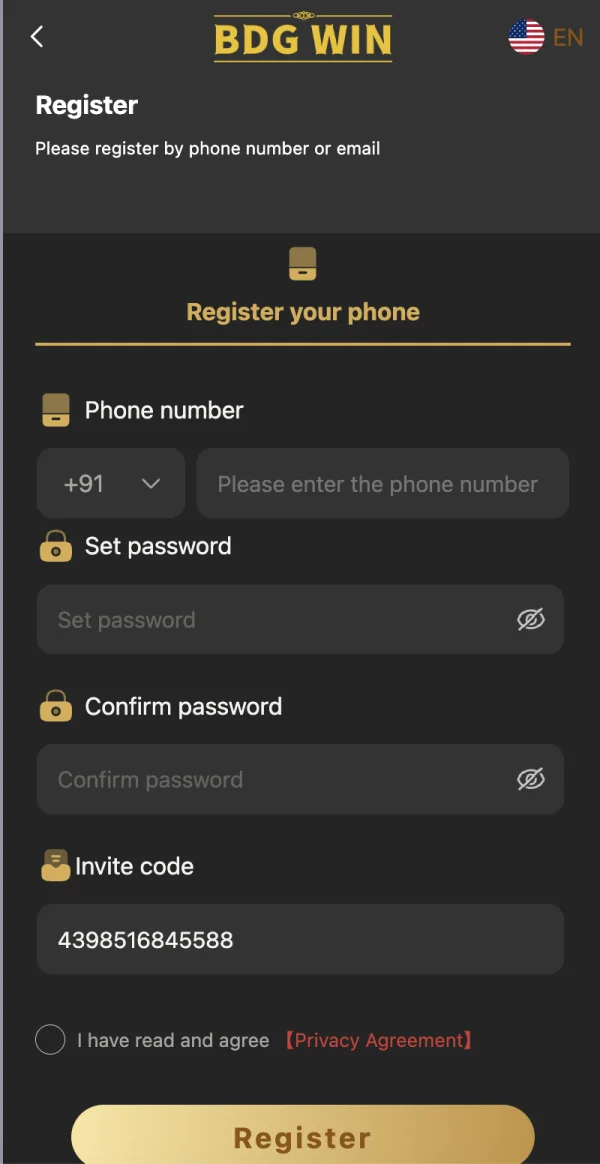
The registration link and its invitation code
The registration destination linked here is https://bdgwin45.com/#/register?invitationCode=4398516845588. The part after invitationCode contains the referral identifier. That code can associate a registration with a referring partner. This website may benefit from qualifying referrals under an affiliate arrangement. Read the provider's current terms before deciding whether to proceed, and do not treat a referral link as an independent recommendation of its financial reliability.
The invitation code for our website is 4398516845588. Check the digits carefully if you decide to use it. It is an invitation identifier, not a password, OTP or withdrawal reference. You do not need to send our website your phone number to read the code. The code is visible in the destination URL and in the registration image used on this website.
We do not attach a guaranteed cash value to the code. A promotional offer, if one is available, depends on current terms set by the provider. Those terms may include eligibility, expiry and restrictions that are not visible in an invitation number. Ask for the complete written conditions before relying on a promotion, rather than assuming that a code by itself promises a credit or a payment.
Check eligibility before creating an account
Registration should begin with the rules that apply to you. A form accepting a phone number does not decide whether the underlying service is lawful in your location. Where real-money games are involved, availability and advertising restrictions need particular attention. Check current government information and the provider's terms rather than relying on the fact that a website loads on your phone.
Read any age condition carefully. Do not enter a false date of birth or use another person's identity to get around an age restriction. If the form does not visibly ask for age, that absence does not remove any applicable age requirement. A later identity check may still apply. Decisions about eligibility should be made before sharing personal details, not after a problem develops.
Also consider whether you want an account at all. You can read the information on this website without registering with the external provider. Creating an account can introduce privacy obligations, marketing messages and account management tasks. If you only need to understand an APK label, a login error or a payment term, the relevant article may answer your question without a new registration.
Recognise the form you are using
The registration image on this website shows a phone number entry, a password field, a confirmation field, an invite code and a privacy agreement control. It also displays the BDG Win name and a Register button. These details help explain the account creation flow. They should not be read as a promise that every field, label or layout remains identical on every visit.
At the destination, read the current form from top to bottom. If its requested details differ significantly, pause before entering information. An unexpected request for a banking password, UPI PIN or unrelated email password is not a normal substitute for creating an account password. The page should make clear what information it is collecting and which terms you are accepting.
Do not confuse a picture of a form with an interactive signup. The registration image on we do not create an account and cannot receive your details. Our external registration button opens the provider destination. You should never type a password into an ordinary email to the publisher or send an identity document simply because it appears to match the wording in an article.
Use a phone number you control
If the registration flow uses a mobile number, use one that belongs to you and that you expect to retain. Recovery often depends on continuing access to the original contact method. A borrowed number can leave the other person receiving account messages and may make later recovery difficult. Permission to borrow a phone for a moment is not the same as long-term control of its number.
Check the country code separately from the local number. In a form with +91 displayed as a selector, read what the adjacent field expects before entering the full international version. Do not add spaces or punctuation unless the form allows them. Take a moment to read back the completed number; correcting an error before submission is easier than trying to change an account contact afterwards.
If the number is already registered, do not immediately try another person's number. The message may mean that you previously created an account and should use login or recovery. It may also need clarification from the provider. Keep the wording of the message and check your own records. A new phone number does not automatically solve an ownership or duplicate-account question.
Choose and confirm the account password
Create a password that you do not use for your email, bank or another website. A long, unique password stored in a password manager reduces the need to remember or reuse it. Follow the actual form requirements. We do not invent a minimum length or character rule for this provider because requirements can change and should be read at the point of registration.
Enter the same password in the confirmation field. If the form reports that the two entries do not match, check for a keyboard mistake or an accidental space. Where a visibility control is available, use it in private to inspect the entry. Do not ask somebody in a public chat to create the password for you or send them both entries to compare.
Save the password against the actual domain rather than a vague name such as game account. If you later encounter several similarly named websites, the domain helps distinguish them. Do not save the password in the same public message that contains your number and invitation code. An invitation code can be public; a password must remain private even when the registration form places them close together.
Read the privacy agreement before accepting
A checkbox next to a privacy agreement represents a decision, not decoration. Open the linked document and identify who controls the information, what is collected and how the operator can be contacted. Look for the treatment of account identifiers, identity documents and payment information. If the document is missing, inaccessible or does not identify the responsible organisation, that is a reason to pause.
Privacy and terms of service answer different questions. A privacy document usually concerns personal information, while service terms can cover account use, eligibility, restrictions and disputes. Reading one does not replace reading the other. If a promotion is important to your decision, look for separate offer conditions too. Keep a copy or a dated record of the terms you actually relied on.
Do not assume that our website's privacy policy controls the external registration destination. bdgwinapk.in.net and bdgwin45.com are different domains with different functions. The provider controls information submitted on its form. Rohit Kumar's publication email is for this website's editorial and contact matters; it is not a channel for collecting provider passwords or completing account verification on your behalf.
What happens when you submit a registration
After completing the required fields, read the entries once more before submitting. The provider may show a success message, request verification or display an error. Follow the actual result rather than assuming that a tap always created an account. If the page stops responding, avoid immediately repeating the whole process under a different number. First determine whether the original registration was recorded.
A successful signup message establishes only what it says. It does not confirm an approved withdrawal, an activated payment method or entitlement to a bonus. Those questions have their own conditions. Keep account creation separate from later decisions about an app, a transaction or a promotional offer. This separation helps you identify which terms and evidence matter when a question arises.
If a verification code is requested, check the delivery destination and use only the current flow you opened yourself. Do not share a code in Telegram or over a call. A code can authorise access even when it looks like a harmless confirmation. If you did not request the message, do not enter it into a link sent by the person who contacted you.
Deal with registration errors without creating confusion
An existing-number error, an invalid-code error and a password-mismatch error describe different problems. Record the exact text. For a mismatch, inspect the two password fields. For an invitation problem, compare the complete code with the linked destination. For an existing account, try the appropriate login or recovery route rather than cycling through numbers until a form accepts one.
If no useful message appears, check whether a required agreement control or field has been missed. A small message can appear outside the area currently visible on a phone. Read the page carefully before assuming that the service is down. If the button remains inactive, document the behaviour without exposing passwords. A focused description is more useful than saying that registration is broken.
Do not respond to a technical error by installing a random app or paying a person who says they can activate the form. Neither action establishes why the original attempt failed. Use the current provider contact route if the form cannot explain the issue. If nobody can identify the operator or provide a clear process, reconsider sharing further information rather than trying increasingly risky workarounds.
Signup through a browser or an app
A browser registration and an app registration may lead to the same provider, but do not assume that solely from matching artwork. Check the domain in the browser and the source of any app. Downloading a file is a separate security decision from creating an account. You should be able to identify why the app is needed and where it came from before allowing an installation.
We do not host a verified APK binary or claim that every file using the BDG Win name is authentic. If a webpage offers a download, inspect the destination and its instructions carefully. Do not disable device protections merely because an unofficial message says installation is required to finish signup. A legitimate account question should not be used to rush an unrelated software decision.
If you already registered in a browser, do not create another account automatically when an app opens a signup view. Look for the login route and use the details associated with your existing account, where the provider supports that access. If the login details do not work, investigate the destination and account relationship. The same brand wording does not prove that two services share account records.
Understand invitation codes without bonus assumptions
An invitation code identifies a referral relationship. It is not a prediction about game results, a guarantee of account approval or a way to avoid identity checks. Code4398516845588 should be understood in that limited context. If a person attaches additional promises to it, ask where those promises appear in current provider terms and whether the person has authority to make them.
A referral can benefit the referring party, which is why this website discloses its affiliate relationship. That benefit can exist even when the visitor does not receive a particular offer. Read both sides of a promotion separately: what the referring publisher may receive and what the registering user is actually entitled to. A general claim such as best bonus does not provide the conditions needed for a sensible decision.
If you entered a different invitation code, we cannot promise that the provider will change it later. Do not create repeated accounts to switch codes. Ask the provider whether changes are allowed and keep the response. We do not access the referral records or make manual adjustments. Contacting our website with a phone number will not enable us to add a code to an external account.
Protect your information after signup
Once an account exists, keep the registration details in a place you control. Store the password securely and record the actual provider domain. Avoid posting a full account page in a group to prove that signup worked. That image may reveal contact information or account identifiers that another person can reuse in an impersonation attempt, even if the password itself is not visible.
Watch for messages that arrive immediately after registration and claim urgent action is required. Read the sender and independently check any requested step. A message containing the brand name is not enough to prove who sent it. Be particularly careful with requests to move a conversation to a private number, install remote access software or share a code that has just arrived.
If you later change your number or email, use the provider's documented update process. Keep the old contact method available until the change is confirmed where possible. Simply editing a saved browser entry does not update the provider's records. Distinguish your local password manager record from the actual account settings so that a future login uses the right information.
Account creation is separate from money decisions
You do not have to make an immediate payment merely because an account has been created. Read current rules and consider whether you should use the service before taking any further step. An invitation, account balance label or promotional message is not a substitute for understanding the operator and applicable law. Avoid acting under pressure from a countdown or a person promising that an offer will vanish.
If there is already a payment dispute, creating a second account will not resolve the original bank record. Preserve the transaction details and correspondence tied to the first account. Do not move between accounts trying to reproduce a result. That can make the record harder to follow and may introduce additional terms or restrictions without improving the original situation.
For suspected financial cyber fraud, use official reporting channels and contact the bank or payment provider promptly. The National Cybercrime Reporting Portal is an Indian government route for reporting cybercrime. Keep the original evidence privately and avoid publishing sensitive transaction information in a public comment. A publisher can explain where to find a reporting route but cannot guarantee recovery or act as the operator.
A registration checklist worth keeping
Before submitting a new account, confirm five points: you understand eligibility, you recognise the destination, you control the contact method, you have chosen a unique password, and you have read the relevant terms. If an invitation is involved, check its digits and its actual conditions. Taking these steps before submission is more useful than trying to reconstruct a rushed decision after a problem appears.
After submission, record what happened. Keep the date, the account identifier and any useful confirmation without saving an OTP or password in an unprotected note. If the provider reports an error, keep that wording too. A clean record can distinguish an incomplete signup from a later login issue and prevents a common mistake: assuming that every unsuccessful attempt created another account.
For this website, the publisher is Rohit Kumar and the editorial contact is [email protected]. Contact that address for corrections to the article or questions about our website. Account creation, verification and account changes remain with the external provider. You do not need to share private login details with the publisher to read any registration information on this website.
Understand what a registration confirmation can prove
A confirmation can be useful evidence that a particular step occurred at a particular time. Save the wording and the destination address along with the date. If the message gives a reference number, keep it with your records. Do not assume that a general welcome message proves completion of every later account check; look at exactly what it confirms.
An account name shown after submission may be generated automatically or may refer to a session already open in the browser. Check the phone number or email before assuming that it belongs to the new registration. This is particularly relevant on shared phones. If anything appears inconsistent, sign out carefully and ask for clarification without changing another person's account details.
A confirmation also does not establish control of every contact method listed in the account. If the number or email is wrong, request correction through a verified process before relying on it for recovery. Saving an incorrect identifier in your password manager can preserve the mistake. Check both the provider's record and your local saved entry so that they agree.
Know what information we can correct
An article can be updated when a label, destination or explanation changes. If you notice an error, tell the publisher which page you read, which sentence needs attention and what evidence supports a correction. A screenshot of a public field can help, provided you remove private details. You do not need to prove your account ownership to report an editorial issue.
Account changes are different. We cannot replace a phone number, approve an identity check, move a referral code, or tell the provider to accept a registration. Requests of that kind must go to the organisation controlling the account. Sending them to an independent article publisher may delay you without creating a support ticket in the provider's system.
Keep the distinction in mind when reading any third-party registration page. The writer may explain a form but still have no access to its administration. A clear contact page is useful, yet it is not evidence that the publisher operates the platform. Use editorial contacts for corrections and verified provider channels for the account actions only the provider can perform.
When you decide not to continue
If you stop before submitting a form, close the page and remove any sensitive text left in an unsaved note or shared clipboard. If you already submitted, do not assume that closing the tab reverses registration. Check whether an account exists and ask about its closure process if you no longer want it. Keep any confirmation of that request.
You can make the decision slowly. An invitation link does not oblige you to create an account, and reading this article does not require you to accept any offer. If the available terms leave important questions unanswered, leave those questions open rather than inventing reassuring answers. Returning later with better information is a reasonable outcome, especially when the service involves personal data or money.
Keep your decision independent of any referral incentive, and never register merely to satisfy a stranger in a chat.
Frequently asked questions
What invitation code is used here?
The registration link contains 4398516845588. It is a referral identifier, not a guaranteed bonus or account password.
Are register and signup different?
In this context both refer to creating a new account. Login is for returning to an existing account.
Does registration guarantee a bonus?
No. Any offer depends on current written provider terms and eligibility. We do not guarantee a promotional credit.