
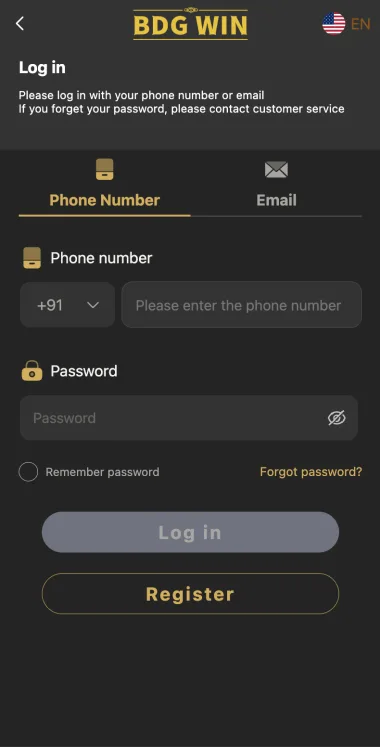
Start with the right login destination
The login destination linked on this website is https://bdgwin45.com/#/login. It opens an external website. bdgwinapk.in.net publishes independent information and does not run that login service, create accounts, or receive passwords. A login link is a route to a provider; it is not evidence of a licence, a successful withdrawal record, or permission to use a money game in your location.
Read the address before you type. Similar names, extra letters and misleading search adverts can make two unrelated websites look connected. If a link takes you somewhere unexpected, close that page and investigate the address. Do not enter an existing password simply because a page uses familiar gold colours or the BDG Win name. A logo can be copied much more easily than an account can be recovered.
When you reach the destination, identify what the form actually requests. An account may use a phone number, an email address or another identifier. Use the option associated with your original registration. Do not assume that every website using this name shares one account database. A password from a different BDG-branded domain may not work, even when both pages look similar.
Login and register do different jobs
Choose login when you already have an account and want to return to it. Choose register or signup when you are creating an account for the first time, after checking eligibility and the current terms. The two forms can sit close together, so it is easy to select the wrong one on a small phone. Read the main heading before entering any information.
Creating another account is rarely a useful first response to a login problem. It can leave you with two different identifiers, separate records and more confusion about where an earlier transaction belongs. The provider may also have restrictions on duplicate accounts. If you remember registering but cannot sign in, start with the original phone number or email and the available recovery process.
Keep the distinction clear when you ask for help. Saying that you cannot register points support towards a new-account issue; saying that an existing account rejects your password points towards recovery. Include the exact error wording rather than calling every problem a login error. A precise description makes it easier to avoid irrelevant instructions and repeated attempts that do not address the cause.
Check your phone number carefully
If you registered using a phone number, enter that same number in the required format. Check whether the country code is selected separately. A form displaying +91 may expect the remaining Indian mobile number in another field. Read the current labels instead of adding or removing digits at random. A number with the country code entered twice may be treated as a different identifier.
Copying a phone number from a message can introduce spaces or punctuation. Autofill can also select an old number without making the change obvious. Before submitting, read the full value rather than checking only the last two digits. On shared phones, confirm that the browser has not inserted somebody else's saved account details. The wrong identifier can make the correct password appear to be wrong.
Changing your SIM does not necessarily change the number registered with an account. If the mobile number itself has changed, ask about the provider's account update or recovery process. Do not create a new account under the new number and assume it will automatically inherit earlier records. Keep any correspondence about a number change so that the identity used in later messages remains consistent.
Use email sign-in only when it belongs to the account
If an email option is available, use the address connected with your account. A phone registration does not automatically mean that any email you control can be used to sign in. Check the account information you saved during registration. If you never added an email address, entering one now may simply produce an account-not-found message rather than fixing the problem.
Watch for trailing spaces and familiar typing errors. A missing dot, an extra character, or a different email provider can send you towards the wrong account. Password managers sometimes store multiple entries for related domains. Read the username and address attached to the selected entry before accepting autofill. Avoid editing a saved password entry until you know which account and website it belongs to.
You should also be able to access the mailbox used for recovery. If that mailbox has been lost or compromised, resetting the BDG Win password alone may not solve the underlying problem. Recover and secure the email account through its own provider. Do not forward reset messages to strangers who offer to complete the login for you; those messages can contain links that grant account access.
Enter the password without repeated guessing
Passwords are generally sensitive to the characters entered, including capital letters and symbols. If the form has a visibility control, use it privately to check for an accidental space or a keyboard mistake. Do not reveal the password while somebody is looking at your phone. A short visual check is more useful than submitting many variations of a password you cannot confidently remember.
Autofill can become outdated after a reset. If you changed a password recently, check whether the browser is still entering the old value. Use your saved record of the new password rather than keeping both versions in a chat or an unsecured note. When the correct entry is uncertain, follow the recovery route instead of making a long series of guesses that may trigger a temporary restriction.
A password should not be reused across unrelated accounts. If a password entered on an unfamiliar website was also used for your email, change the email password through the email provider first. The importance of that step is practical: access to a mailbox may enable further account resets. We do not need your password to explain an error and will never ask you to send it by email.
Understand what an error actually says
An incorrect-password message is different from an account-not-found message. The first may indicate a password problem; the second may involve the phone number or email, registration completion, or the website being used. Neither message gives enough information to conclude that money has disappeared or that the account has been permanently deleted. Write down the exact wording before trying a solution based on assumptions.
A message about too many attempts usually calls for a pause, not faster retries. Read any waiting instruction displayed by the provider. We do not publish a fixed cooldown because this website cannot verify the provider's current security settings. Repeatedly refreshing, changing networks and requesting several reset codes at once can make it harder to understand which attempt generated which response.
If the page says that access is restricted or that you must contact support, do not treat that as a normal typing mistake. Keep the message, the time and the website address. Request a written explanation through a channel you can verify. Avoid anyone who promises to remove a restriction in exchange for a personal transfer, a remote access session or disclosure of an OTP.
When the login button does nothing
First check whether the form has identified a missing field. A small validation message can appear above or below the area you are viewing. Read the page before pressing repeatedly. A disabled button may reflect an incomplete entry or an unchecked condition, while a button that spins indefinitely may involve a connection problem. Those situations need different responses even though neither has completed a login.
Check whether other websites load on the same connection. If the whole connection is slow, fix that problem before submitting account information again. If only the provider's page fails, wait and record the time. A loading problem is not proof that you need a new app, a new account or a payment. Do not install a file sent by a stranger as a supposed login repair.
You can try a current browser that you already trust. Keep the original address in view and avoid changing several things at once. If a normal browser works but an app does not, record that difference when asking for help. Clearing all device data is an excessive first step and may remove useful records. Start with a narrow, reversible check that does not affect unrelated accounts.
Browser sessions and saved account details
A saved session can make it seem as though no login is required. That convenience also means that somebody with access to an unlocked device might open the account. Use a device lock and sign out on shared equipment. Closing a browser tab is not always the same as ending a session, so look for an actual logout option when you finish on a phone or computer you do not own.
If an unexpected account appears after login, stop before changing information or making any transaction. Check the phone number or email in the account area and compare it with the details you intended to use. Saved cookies and autofill can both cause mix-ups on shared devices. Do not inspect or copy another person's records. Sign out and start again using your own details on a device you control.
A private browsing window can help distinguish a saved-session issue from an account issue, but it does not establish whether a website is genuine or whether access is lawful. It also does not fix a forgotten password. Treat it as a limited browser check. Once you know whether an old session is involved, use the appropriate recovery or sign-in process rather than relying on repeated private windows.
Password recovery and OTP requests
Use the provider's own recovery option if you cannot remember the password. Check the destination before requesting a code and read where the code will be delivered. Requesting recovery for the wrong phone number or email will not help you regain access to your account. It may also confuse another person who receives an unexpected message, so confirm the phone number or email before you submit it.
If a code does not arrive, check the relevant inbox, message filtering and network reception. Read any resend timer. Several requests in quick succession can leave you with multiple messages and uncertainty about which one is current. We cannot verify the provider's delivery speed or code lifetime. Follow the instructions attached to the current recovery attempt rather than timings quoted in an old blog or a chat.
Do not share a recovery code with a person who contacts you. Enter it only into the recovery flow you deliberately opened after checking the address. A caller who already knows your name or phone number has not proved that they work for the provider. If recovery requires identity checks, first confirm what is required and which secure route the provider offers for submitting those documents.
Keep account access separate from payments
Logging in should not be confused with resolving a deposit or withdrawal issue. If you can access the account but a transaction is pending, keep the transaction reference and follow the relevant dispute process. Creating another account or changing the password will not necessarily change a payment status. Treat the account record and the bank or payment record as separate pieces of evidence.
If somebody says you must make an extra transfer before an existing account can be unlocked, pause. Ask for the written rule and verify the contact independently. Do not accept a screenshot of a promise as a substitute for the provider's published terms. An urgent demand, secrecy or instructions to send money to a personal address are reasons to preserve the conversation and seek independent help.
For suspected financial cyber fraud in India, the National Cybercrime Reporting Portal provides an official reporting route. Contact your bank or payment provider promptly as well, using contact information you obtain independently. Keep original messages and transaction details. Reporting is a separate step from contacting the gaming website, and a report does not guarantee that any payment will be recovered.
Describe a login problem clearly
A useful support message states the website address, whether you used a phone number or email, the exact error and when it started. Include the device and browser if the problem appears specific to one of them. You can say that you checked the phone number or email and tried recovery once. This gives the recipient a clear starting point without exposing a password or making them guess which form you used.
Keep screenshots focused on the error. Cover passwords, OTPs, full account numbers and unrelated personal information before sending a copy. Preserve an original privately if you need it for a formal complaint later. A public Telegram group is a poor place to post an entire account page because anyone in the group may copy it. Ask whether there is a private, verifiable support route instead.
Keep one chronological record of the conversation. Note the date of your first request and any reference number. Sending the same issue to many unofficial contacts can produce conflicting instructions and make impersonation harder to spot. If a reply asks you to do something materially different from the published process, verify that instruction before following it, particularly when it involves identity documents or money.
Avoid common login shortcuts
Do not buy an account to bypass a login problem. You may not control its recovery details, and the account may belong to somebody else. A shared username and password do not establish ownership. Even if access initially works, a person controlling the recovery phone or mailbox may later regain it. Use an account that is legitimately yours and a recovery channel that you control.
Do not install a modified APK merely because it claims to fix sign-in. A download with a familiar name can still be unrelated to the intended provider. Adding another app also makes diagnosis harder when the original issue was a mistyped number or an expired session. If you are checking an app, consider its source and permissions separately from the question of whether your existing login details are correct.
Do not use a VPN to evade a location restriction. A restriction may reflect legal, contractual or security conditions that changing an apparent location does not resolve. This page explains account access; it does not provide permission to use a service. Check the current rules that apply to you before continuing, especially when a platform includes real-money activity.
What to do after access is restored
Once you can sign in, check the phone number or email and any available account settings. Confirm that the recovery details still belong to you. If you reset the password because of suspicious activity, review whatever session or device controls are available and remove unfamiliar access where the provider supports that action. We do not assume that a particular security feature exists; use the controls you can actually see.
Save the new password in a password manager you trust and update the correct entry. Remove an obsolete entry only after confirming which website and account it represents. Keeping several nearly identical records labelled simply BDG can cause another mix-up later. A clear entry name that includes the actual domain is more useful than a label based only on the brand name.
Finally, keep a private note of the resolution. For example, record that an old browser entry contained a different phone number, or that recovery was needed after a password change. You do not need to save the password in that note. Recording the cause helps you recognise the same problem without repeating every step, while leaving sensitive login details in their proper protected storage.
A short checklist before another attempt
Before pressing login again, confirm the destination, the account identifier and the password entry. Check that you are using login rather than registration, and read any current error or waiting instruction. If one of these points is uncertain, resolve it first. Another submission with the same unresolved mistake is unlikely to give you better information and may create an avoidable temporary restriction.
If the form loads but the account does not open, keep the exact message and use a relevant next step: recovery for a forgotten password, a connection check for a stalled page, or a verified support request for an explicit restriction. These are different routes. Following the right one is more effective than searching for an entirely new website every time an attempt fails.
We can explain the process, but we cannot inspect your account or confirm a provider's current account status. Do not send login details to Rohit Kumar or to our email. For account changes, use a route controlled by the relevant provider after checking it carefully. For editorial corrections about this page, contact [email protected] without including private account information.
Recognise an account issue that needs a different route
If the concern is an unfamiliar transaction, do not spend all your time changing browser settings. A browser check may restore access, but it will not explain why an entry appeared in an account history. Keep a dated copy of the record, compare it with your own bank or payment information, and raise the discrepancy in writing through an appropriate verified channel.
If your phone has been lost, treat device and SIM security as the immediate problem. Contact the relevant mobile provider and use the device manufacturer's own lost-device tools where available. A website password reset is only one part of the response. Recovering control of the number and mailbox matters because those channels may receive future reset requests.
If you are trying to stop using the service, you may need account closure rather than another successful login. Ask for the documented closure process and what records must be retained. You can also remove marketing permissions and saved local login details separately. Uninstalling an app does not necessarily delete an account held by an external provider.
The useful question is therefore not only how to log in, but what you need to accomplish once access is restored. Recovery, a transaction dispute, a contact update and closure have different evidence requirements. Describe the intended outcome clearly in your request. This helps keep the conversation focused and reduces the chance that a generic login instruction will be mistaken for a complete resolution.
Frequently asked questions
What is the BDG Win login link on this website?
The linked destination is https://bdgwin45.com/#/login. It is an external service; we do not operate the login system.
Should I register again if I cannot log in?
Start with recovery for the existing account. A second registration may create separate records and may conflict with provider rules.
Can Rohit Kumar recover my account?
No. The publisher can correct article information but cannot reset passwords or access provider accounts.