
Write down the symptom before changing anything
Start with the exact behaviour. A blank page, a disabled button, an incorrect-password message and an account restriction should not all be described as the app is down. Read any message completely and note when it appeared. If you can take a screenshot safely, keep one that shows the error without revealing a password, code or unrelated private information. A small amount of evidence at the beginning saves a great deal of guessing later.
Think about the last successful access. Was it on the same phone, browser, network and domain? Did you change a password, SIM, email address or device since then? These details give you a starting point, but they are clues rather than proof. A new phone does not automatically mean the account has been lost. A failed attempt on a different domain does not prove that the original account was removed.
Choose one problem to investigate at a time. If you change the identifier, password, browser and network together, a later success will not tell you which change mattered. If the attempt fails, you will have four new possibilities instead of one. A short timeline such as page opened, identifier accepted, password rejected helps you make a specific decision about the next step.
Verify that the destination matches the account
The login link used by our website points to https://bdgwin45.com/#/login. This is an external destination. It is not operated by bdgwinapk.in.net, and we cannot check its account database. Before entering details, compare the destination with the domain associated with your original registration. A similar BDG name does not establish that two websites share account records or have the same operator.
If your saved record points somewhere else, do not keep trying the same password on every similarly named page you find. Open your password manager entry, previous correspondence or a bookmark you had already checked. Identify the original service first. An account-not-found message on a new website may simply mean that you have reached a different account system, not that the old account disappeared.
Be careful when somebody says that a fresh domain is the new official link. Ask how that relationship is established and inspect the address independently. Matching artwork, a Telegram profile picture or a forwarded announcement is not enough. NIST's phishing guidance recommends verifying requests through known contact information rather than relying on contact details included in an unexpected message. Apply that principle before entering existing credentials.
If the page itself will not load
Check whether other ordinary websites work on the same connection. If nothing loads properly, investigate the connection before changing account details. If other sites work and this destination does not, keep that distinction in your notes. It points towards a site-specific access or availability question, although it does not tell you the cause. Avoid concluding that you need a new account from a loading failure alone.
Read the browser's actual message. A certificate warning, a name-resolution error and an access-denied response are different from an empty page after a long wait. Do not bypass a security warning just to continue troubleshooting. Record the address and wording. A provider must explain a significant destination or access issue through a reliable channel; a private contact should not ask you to ignore every warning without explanation.
Do not use a VPN to work around an access restriction. A working connection through another location does not resolve a legal or provider restriction. India's online gaming framework needs to be considered before using services involving money games. MeitY publishes the Act and related notifications. A page being unavailable is not a reason to override safeguards or assume that a technical workaround makes the underlying activity permitted.
If the login button stays inactive
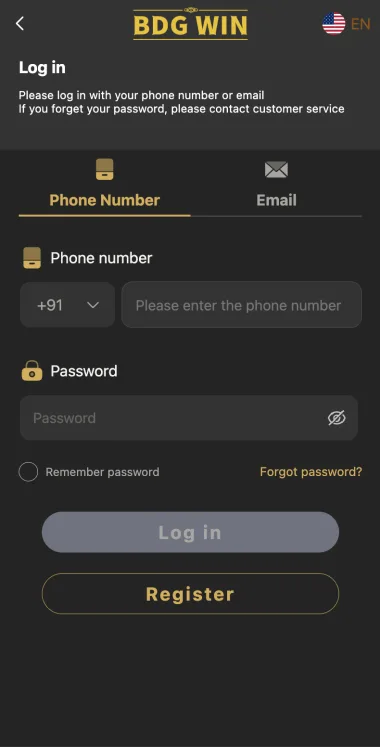
Read the visible fields and any agreement controls before pressing again. A button may remain inactive while an entry is incomplete or fails a format rule. On a phone, the message can appear outside the part of the page currently visible. Move through the form carefully and check for a small explanation near each field. Do not assume that repeated taps will complete information the form still considers missing.
Look for accidental spaces introduced by copying a number or email. Check whether a country code is selected separately from the phone number. If the form has two sign-in options, confirm which one is active. A phone number entered into an email field may be rejected without anything being wrong with the account itself. Correct the input according to the current labels rather than a remembered layout.
If all required entries appear complete but the button remains inactive, capture the behaviour without exposing the password. Note the browser and device. Try a current browser you already trust if that is a reasonable, reversible check. Do not install an unknown APK from a chat as a way to repair a disabled button. A new software installation is a separate security decision with its own risks.
If the password is reported as incorrect
First confirm the identifier associated with the attempt. The right password for one account will not work with a different number or email. A saved browser entry may contain an old identifier, especially on a shared phone. Read the complete entry rather than checking only the first or last digits. If you find a mismatch, correct that before deciding that the password needs another reset.
Check whether autofill is entering a password that became obsolete after an earlier change. Password managers may contain several entries with similar names. Read the domain attached to the selected entry and choose the one for the intended account. Where a visibility control is offered, inspect the password privately for a typing error. Do not reveal it to somebody who offers to compare it for you.
If you cannot confidently identify the current password, use the provider's recovery process. Do not submit many variations from passwords used elsewhere. This can create a restriction and exposes a poor security habit. Recovery should result in a unique replacement password saved against the correct account. It should not require you to tell our website or a Telegram contact what the old password was.
If the account cannot be found
An account-not-found response should send you back to the original registration details. Check the domain, phone number, email and country-code format. If you have several numbers, do not try every combination rapidly. Use your own records to identify the contact method you actually registered. A careful check is more useful than creating a new account with whichever number the form accepts.
Consider whether registration was ever completed. You may have filled a form and closed it before submission, or received an error that did not create a record. A saved password entry only proves that information was stored locally; it does not prove that the provider accepted the registration. Look for a clear confirmation or a previous successful login before assuming that an account definitely exists there.
If you have evidence of a previous account but the current destination cannot find it, ask the provider for clarification through a verified route. Describe the identifier type and approximate registration date without sharing the password. Do not assume that another BDG-branded website can locate the record. An independent publisher cannot search across external account systems or transfer a record from one provider to another.
If a waiting period or restriction appears
Read the displayed instruction and pause. A message about too many attempts is a reason to stop repeated submissions, not to speed them up or alternate several devices. We cannot verify a fixed waiting period for this provider, so an old blog's claim about a certain number of minutes should not override the current message. Keep the time of the restriction in your record.
A restriction requiring contact with support is different from a normal password typo. Ask what the restriction means, what information is needed and how a review will be communicated. Keep the request in writing where possible. Do not assume that paying a person who calls themselves an agent will remove it. Ask for the published rule if a new payment is claimed to be necessary.
Avoid a second registration as a way to bypass the restriction. It creates a separate account and may conflict with provider terms without solving the original access issue. If your concern is an existing record or unresolved transaction, a fresh identifier makes the evidence harder to follow. Keep the original account question together and seek a clear explanation rather than scattering it across new accounts.
If recovery works but the next login fails
A reset confirmation and a successful login are separate events. Note the time the reset completed and the identifier used. Then check that the subsequent login used that same identifier and the newly saved password. An old autofill entry is an easy source of confusion. Update the correct entry only after you know which password the provider accepted, and retain unrelated account entries carefully.
If the reset appeared successful but the page immediately rejected the new password, write down that sequence. Do not repeat the full process with five new passwords and lose track of which attempt was accepted. A support request should explain the specific transition: reset confirmation followed by rejection at login. Include the address and error wording, but exclude the password and reset token.
Recovery messages also need independent scrutiny. If the reset link opened a different domain unexpectedly, stop and investigate before proceeding. A confirmation on an unrelated page does not prove that the intended account password changed. If credentials were entered somewhere suspicious and reused elsewhere, secure those other accounts through their legitimate providers. The access problem may now involve more than one service.
If the app fails but a browser works
A difference between app and browser behaviour is useful evidence. It may involve the app version, its destination or a local issue, but the difference alone does not identify the cause. Record the app information you can see and the exact browser address that worked. Do not assume that an app with the same icon is necessarily connected to the browser account.
If access works in a browser you already trust, avoid installing another file merely to reproduce the result. Check the app source and current provider instructions before deciding whether an update is appropriate. An APK sent by an unknown account can introduce a new problem. Removing or updating an app should be a deliberate software decision, not the automatic response to every login failure.
Remember that uninstalling can remove local information without closing the external account. Save any relevant error records before cleanup, and do not assume that clearing app data resolves a pending transaction. The account, the software on the phone and the payment record are three distinct things. Your next step should address the one that actually failed rather than treating them as interchangeable.
If the wrong information appears after login
Stop if the account details do not match the record you intended to open. Do not change anything or inspect another person's information. On a shared device, an existing session or saved identifier can open a different account. Sign out using the available control and start again with your own details. Closing a tab alone may not end the existing session.
If the identifier is yours but expected records are missing, check the destination and any relevant dates before assuming a loss. Preserve what you can see without exposing private details. Ask the provider to explain the discrepancy in writing. A different-looking page does not by itself establish that the account has been transferred or that all records should appear in exactly the same location.
Do not post an entire account page publicly to ask whether it looks correct. It can reveal information unnecessary to answer the question. Prepare a limited, redacted image of the issue and use a verified support route. Retain the original privately if a complaint may require it. The goal is to document a discrepancy without creating an avoidable disclosure of account or payment information.
Separate access help from a transaction complaint
If login succeeds but a withdrawal is pending, the login problem is resolved while the payment question remains. Record those outcomes separately. Browser resets and password changes do not necessarily affect transaction processing. Keep the transaction reference, date, amount and status alongside relevant bank or payment information. These are more useful for a payment complaint than a history of repeated password attempts.
An extra payment demand should be examined independently. Do not send money to a personal account because somebody says it will unlock login, release a balance or activate support. Ask for the provider's current written rule and verify the contact through a separate channel. A forwarded image of a promise is not equivalent to a documented process from an identifiable operator.
For suspected financial cyber fraud, contact the relevant bank or payment provider promptly and consider the official National Cybercrime Reporting Portal. Keep original correspondence and transaction evidence privately. We cannot investigate bank transfers or guarantee recovery. A support chat with a gaming contact is not the same as a report to a financial institution or an official authority.
Create one concise support request
Your message should state the destination address, account identifier type, exact error and approximate time. Mention whether the page loads, whether recovery was attempted and whether the behaviour differs between app and browser. Keep it factual. Saying that login rejected the saved password after a successful reset is clearer than saying everything is broken and asking the recipient to guess what happened.
Do not include a password, OTP or complete reset link. If ownership checks are needed, ask what limited information is required and how it should be submitted securely. Public groups are unsuitable for identity documents or full payment records. A person asking for unnecessary secrets in a private chat has not established authority merely by using the correct logo or knowing your account name.
Keep a copy of the request and any reference number. If you follow up, refer to the same timeline rather than sending conflicting descriptions to many contacts. Record acknowledgement separately from resolution. A response saying the case was received does not prove that access was restored. When the issue is fixed, note what changed so that a future occurrence can be assessed without repeating the entire investigation.
Know when to stop troubleshooting
Stop when the next proposed step requires an unverified download, remote access, another person's number or an unexplained payment. These are not ordinary browser checks. They change the risk of the situation and may affect unrelated accounts. A persistent login problem is frustrating, but it does not make every offered shortcut sensible. Preserve the facts and ask for a documented process instead.
You should also stop repeating a step that produces the same result without new information. Ten identical attempts do not usually provide ten useful pieces of evidence. The next action should answer a new question: whether the identifier is correct, whether recovery reached the right destination or whether the provider has imposed a restriction. If it cannot answer a specific question, reconsider why you are doing it.
This page is published by Rohit Kumar at bdgwinapk.in.net. Email [email protected] for an editorial correction, with the article address and the wording that needs attention. Do not send private account credentials. We can improve our explanation, but only the organisation controlling the external account can review a restriction, confirm a record or make an account change.
A worked example: an old saved number
Suppose a person changed phones and the browser now fills a number used several years ago. The page opens normally, but the password is rejected. Changing networks would not address the mismatch. The useful check is to inspect the identifier saved with the password and compare it with the contact method attached to the intended account. This is a hypothetical example, not a claim that the publisher tested a reader account.
If correcting the identifier restores access, update the appropriate saved entry and record the cause in a private note. You do not need to keep the wrong password attempt as a secret-bearing screenshot. If access still fails, you have eliminated one possibility and can move to recovery with a clearer account identifier. A single careful check can make the next message much more specific.
A worked example: a loading issue mistaken for lost access
Consider another situation: the page stays blank before any form appears, while the user assumes that their password has expired. Requesting a reset from a random search result would introduce a different destination before the first issue is understood. The better starting point is to record the browser error and confirm whether the intended domain can be reached. No password has been tested in that original attempt.
If a verified provider reply later explains an availability issue, keep that response and wait for a documented next step. Do not treat the delay as a reason to share credentials with a supposed agent. The example shows why symptom categories matter: the correct response to a page that never loads is not automatically the correct response to a form that explicitly rejects a password.
Review the outcome, not just the last tap
After an attempt succeeds, confirm that the intended account opened and that the original question is answered. A successful form submission is not the same as resolving a restriction, updating a lost number or settling a payment complaint. Write down which outcome was achieved and which issue, if any, remains. This avoids closing a case prematurely because one part of the process started working.
If no safe next step is available, leave a precise record and pause. You can wait for a verifiable explanation without installing extra software or submitting more personal information. The aim of troubleshooting is to narrow uncertainty while protecting the account. It should not require you to keep escalating the amount of access, money or private data you give to an unknown contact.
Keep one last distinction in the record
A login becoming available does not prove why it previously failed. If the provider gives no explanation, record the outcome without inventing a cause. You can say that access returned after a particular check while leaving the underlying reason unconfirmed. That honest distinction is useful if the same symptom returns and a more detailed review is needed.
Frequently asked questions
Why is BDG Win login not working?
The cause depends on the symptom. Check the domain, identifier and exact error before choosing password recovery, a browser check or a provider support request.
Should I make a new account?
A second account does not recover the first. Use existing-account recovery and ask the provider about a persistent restriction.
Can a new APK fix the login?
Do not assume so. A download is a separate security decision, and an unknown file may make the situation worse.